


Airconsole Enterprise Server
Deploy Instantly on Amazon EC2
Airconsole Enterprise Server (previously "Airconsole Enterprise Server") enhances the functionality of the Get Console App and Airconsole. It aggregates roaming iPads/iPhones running Get Console, standalone Airconsoles, and Airconsole TS Console Servers into a single on-demand cloud based terminal server. NOC operators can remotely access, control and execute scripts on remote equipment in the field, regardless whether that equipment is fixed or mobile.
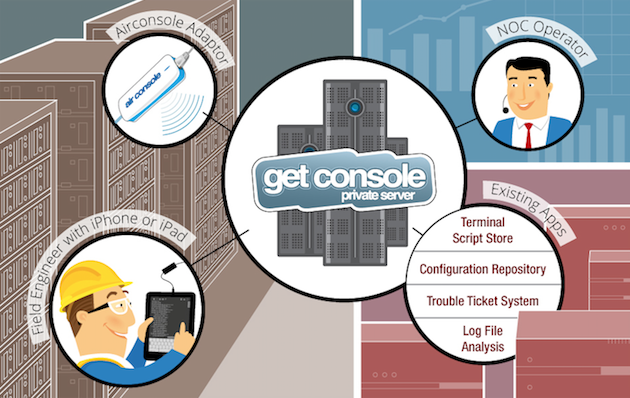
Introducing our Enterprise Edition - the Airconsole Enterprise Server
Airconsole Enterprise Server is designed to provide NOC operators, Colocation operators or any company responsible for managing remote infrastructure with a simple but powerful aggregation point for remote serial console access. Obtaining remote control of equipment in the field is simple, reliable, fast AND cost effective.
-- Direct Terminal Control to remote Get Console Apps and/or Airconsole devices
-- Push or Pull Configurations from remote devices
-- Remotely execute Expect style scripts ("wait for X on screen, do Y")
-- Fetch and manage Get Console Logs
-- Integrated GUI Script Creation tools
-- Integrates with other NOC Systems
The Cloud Based Serial Terminal Server
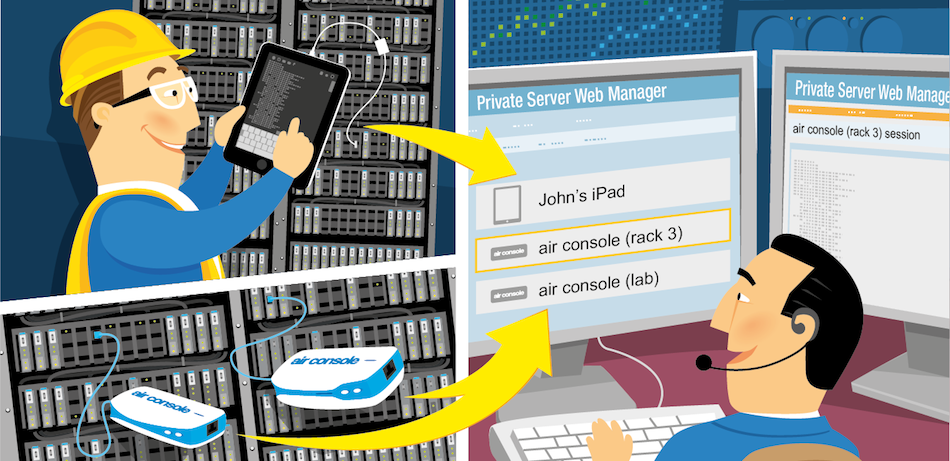
Support Roaming and Fixed Equipment
Airconsole Enterprise Server is unique in that it can aggregate both roaming field engineers connecting to field devices via their iPads and iPhones, AND fixed Airconsole serial-over-IP adaptors into a single web dashboard. A web user now has a single place to go to see and control all remote field equipment.
-- Provide Help to Field Engineers on demand - see what they see on the terminal
-- Access, reconfigure, upgrade remote field equipment without leaving the browser
-- Work faster, more effectively with experienced central engineers taking control
-- No need for different Server apps to support roaming vs fixed serial terminal servers
Fast and Reliable
Airconsole Enterprise Server is FAST - We have optimised the Serial over HTTPS protocol used from Airconsole and Get Console apps to provide a predictable terminal experience regardless of network latency. Have confidence in managing and operating remote equipment - even equipment a long long looooong way away from the NOC.
-- Optimised "Firewall Friendly" Serial over HTTPS protocol, with multiple fallback options
-- Reliable over laggy transports - TCP based, and sessions auto-resume if connectivity is broken
-- Auto-reconnection: Airconsole will call you back if the connection is closed uncleanly
Feature Rich Terminal
Airconsole Enterprise Server integrates full terminal scripting support, logging, configuration repository and integration with existing NOC tools such as ticketing systems. Deploy into an existing network and equipment support environment without replacing existing tools.
-- Built in Script Manager allows easy script creation and execution, along with import/export
-- Full Logging keeps an audit trail of all changes made on remote equipment - rollbacks are easy
-- Simple SMTP integration with existing ticketing systems lets field engineers update tickets via mail directly from Get Console app
Secure Remote Access
Airconsole Enterprise Server encrypts all communication using SSL, using only the latest ciphers. Have confidence in transmitting sensitive field device configuration information over the WAN using the same encryption banks use.
-- Bank grade encryption on serial sessions
-- Self hosted VMWare deployment can require NO internet connectivity for on-net connections
-- VPN remote option can force iOS Device roaming clients to VPN first before sharing terminal
-- Amazon Private cloud offers private line WAN link options for fully private network connections
Airconsole Enterprise Server Licensing
And the best part is the price. Airconsole Pro and XL adaptors already include licenses. Additional licenses for Airconsole Standard and GetConsole App users are available very reasonably on a per client basis, or on a Get Console hosted server get unlimited licenses AND Amazon hosting for just $99.00/mth all inclusive and instantly provisioned. For Self hosted installations additional licenses for iPads and iPhones running Get Console and Airconsole Standard terminal servers are available here.
Airconsole Enterprise Server Resources
Compare Deployment Options
Download the Datasheet
Get the latest User Manual 1.6
Self Hosted
Download in OVF format (951Mb)
Buy Licenses for Self Hosted Servers
Activate Licenses for Self Hosted Servers
Airconsole Enterprise Server 2.1 on Amazon EC2
Install in your existing EC2 cloud (BYOL)
Let us Host your Airconsole Enterprise Server
Cancel a Hosted Airconsole Enterprise Server
Airconsole Enterprise Server Licensing
Learn about Pricing Options
Having issues?
Visit Support Portal
Buy Paid Telephone and Email Support for Self Hosted Airconsole Enterprise Server
Visit our Community Forum
 TOP
TOP
